Agent Mode improvements
Agent Mode has received a few helpful upgrades that make working inside Excel more convenient.
You can now use web search directly from Agent Mode to pull external information into your workbook.
There is also support for multiple AI models, which means you can choose different reasoning styles when analysing or transforming data.
Agent Mode is also available in Excel for Windows for Insider channels, which allows more users to try these AI features natively.
Why this helps
You can gather information without switching between applications.
You can explore data using different AI reasoning approaches.
You can do more work from inside the same file, which keeps your flow uninterrupted.

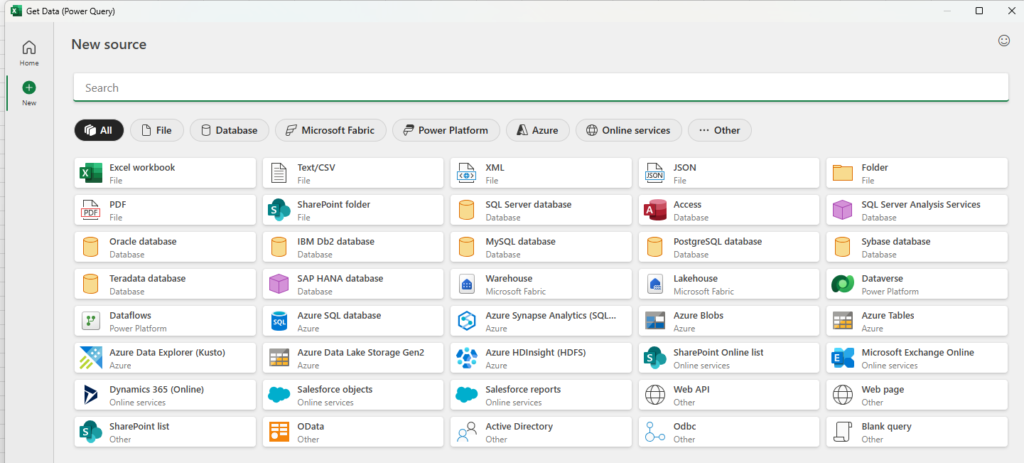
Modernised Get Data interface
The Get Data window has been updated with a cleaner and more organised layout.
It provides quicker access to common sources and makes the data connection process feel simpler.
You spend less time navigating menus and more time working with your dataset.
The new layout is easier for users who frequently import data from files, servers, or external systems.
Comment previews on protected workbooks
When someone comments on a protected Excel file, you can now preview their comment from the email notification without unlocking the file.
It reduces back and forth communication and makes collaboration smoother.
You can quickly understand the feedback even when the workbook is locked.
Updates for iOS users
Excel on iPhones and iPads now has refreshed styling and improved template organisation.
Templates are easier to browse and filter, which helps when you want to start with a ready-made layout.
Mobile users can manage files and templates more easily when working on the go.
How these updates impact your workflow
These improvements may seem small on their own, but together they help you gather data faster, collaborate more smoothly, and work consistently across devices.
- Agent Mode helps you think and analyse inside your workbook.
- The updated Get Data experience reduces the time needed to prepare data.
- Comment previews simplify team communication.
- Mobile improvements keep your work accessible when you are away from your laptop.
Conclusion
These Excel updates focus on improving everyday tasks, from importing data to reviewing feedback. If you want to explore related tips that make your tables easier to read and present, I will share the link to last week’s blog, which covers practical ways to format tables clearly.
If you want tips to make your tables easy to read, check out the last week’s blog by clicking here