
Introduction
Let us continue that 4:42 pm scenario.
The real problem was never intelligence. It was context. Most AI tools read flattened text. Spreadsheets lose structure. Long instructions get ignored. Sessions collapse after 20 minutes. You end up doing the work manually anyway.
The newer Claude workflows described in the reference material shift the focus from prompt engineering to workflow engineering. Instead of writing better prompts, you build better context, better collaboration, and better execution systems.
Here is what that means in practice.
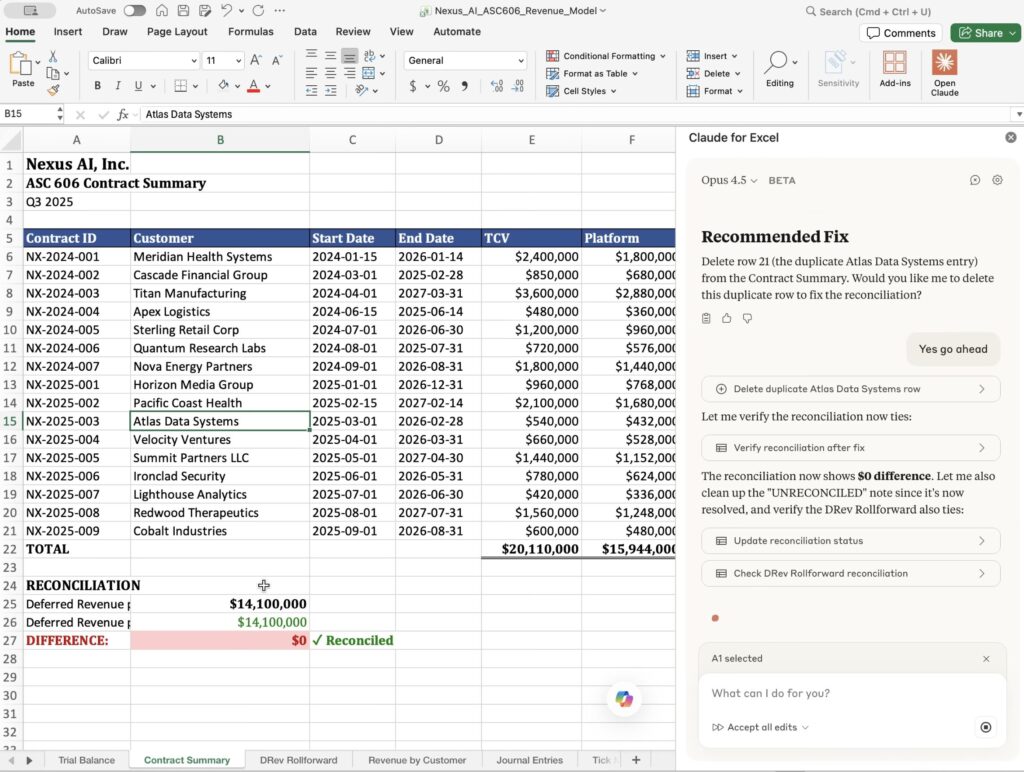
Claude Inside Excel Changes the Debugging Experience
One of the most practical shifts is Claude running directly inside Excel through an add in. Instead of flattening spreadsheets into text, it operates within the workbook environment.
That enables actions such as:
- Explaining what a specific formula does in plain English
- Tracing a cell back to its source inputs
- Identifying and locating REF or VALUE errors
- Cleaning messy exports with inconsistent date formats
- Extracting structured tables from PDFs directly into Excel
- Building financial models with working formulas
The difference is structural awareness. When AI understands the sheet layout and relationships, its answers become more relevant.
For professionals, this means:
You can review inherited models faster.
You can debug without manually tracing every dependency.
You can clean raw exports without spending hours restructuring data.
However, there are clear boundaries:
No macros or VBA.
No Power Query or Power Pivot.
No external database connections.
And it should not be used without review for audit-critical calculations or highly sensitive data.
The value here is acceleration of understanding and drafting, not replacement of professional judgment.
Claude Cowork Enables Real Collaboration
Many AI frustrations come from session breakdown.
You give detailed instructions.
Half are ignored
The tool apologizes
It loops.
Claude Cowork introduces a more structured collaboration model. It is designed to:
- Follow long instructions more consistently
- Sustain multi-hour sessions
- Ask clarifying questions through AskUserQuestion
- Avoid repetitive loop behavior
- Create actual files instead of only text
This matters because real work is iterative. Reports evolve. Slides get revised. Research pivots midway.
A tool that collapses after 20 minutes limits what you can build. A tool that sustains context expands scope.
For consultants, analysts, and content creators, that changes the ceiling of what AI can realistically support.
Context Files Replace Prompt Libraries
Another strong idea is that there is no magic prompt.
Saving dozens of 500 word templates rarely solves the root problem. The reference suggests building markdown context files instead.
These files can contain:
- Voice profiles
- Writing principles
- Decision frameworks
- Rules and constraints
- Good and bad examples
At the start of a session, you upload these files and instruct the AI to read them fully before execution. You then let it ask clarifying questions before starting.
This changes AI usage from instruction dumping to context design.
For career professionals, this means:
More consistent outputs.
Less generic language.
Better alignment with your thinking style.
Reusable AI systems instead of ad hoc prompting.
Workflow clarity becomes more important than tool selection.
File Creation Reduces Execution Friction
Another practical advantage is direct file creation.
Instead of copying text into PowerPoint or Excel manually, Claude can generate:
- Slide decks
- Excel files with working formulas
- Expense reports from receipt images
- Structured research briefs with organized themes
For example, generating an expense report from dozens of receipts shifts the work from manual entry to review and verification. The time difference is significant, but more importantly, the cognitive load shifts toward validation rather than construction.
This reduces tool switching and formatting overhead. It makes AI part of execution rather than just drafting.
That distinction matters in professional environments.
LLM Battle as a Professional Discipline
The reference also introduces a structured framework where one model’s output is challenged by another.
The logic is simple:
Generate advice from one AI.
Ask another AI to confirm or confront it.
Compare reasoning.
This reduces confirmation bias and improves decision quality.
It is especially useful for:
- Strategic planning.
- Complex research questions
- Growth decisions.
- Business model analysis.
Rather than trusting a single answer, you introduce structured disagreement. That strengthens reasoning and reduces blind spots.
Used carefully, this becomes a professional discipline rather than a gimmick.
What Claude Still Cannot Do
No workflow discussion is complete without boundaries.
Claude inside Excel does not support:
- Macros or VBA
- Power Query or Power Pivot
- External database connections
Additionally:
Audit critical deliverables must be reviewed.
Sensitive financial models require proper controls.
AI can assist in understanding, building drafts, and cleaning data. It does not remove the need for accountability.
Should You Switch Completely
The deeper lesson from these workflows is not tool loyalty.
It is a system design.
If you:
- Build structured context.
- Encourage clarifying questions.
- Sustain long sessions.
- Validate critical outputs.
- Introduce cross-model checks when needed.
Then you are operating at a higher maturity level with AI.
Claude currently aligns well with this approach. But the real leverage is in how you use AI, not which logo you prefer.
Conclusion
Claude feels different in 2026, not because it is magically smarter, but because its usage model emphasizes:
- Context over clever prompts
- Conversation over one-shot commands.
- Execution over text generation.
- Verification over blind trust.
For professionals working in Excel, reporting, research, and structured content, these workflow shifts are practical and measurable.
And as always, focus less on hype and more on how the tool fits into your daily workflow.