

These five habits do not show up as a big number in one place. They show up as doing the same piece of work two or three times, and as conversations that get worse the longer they run.
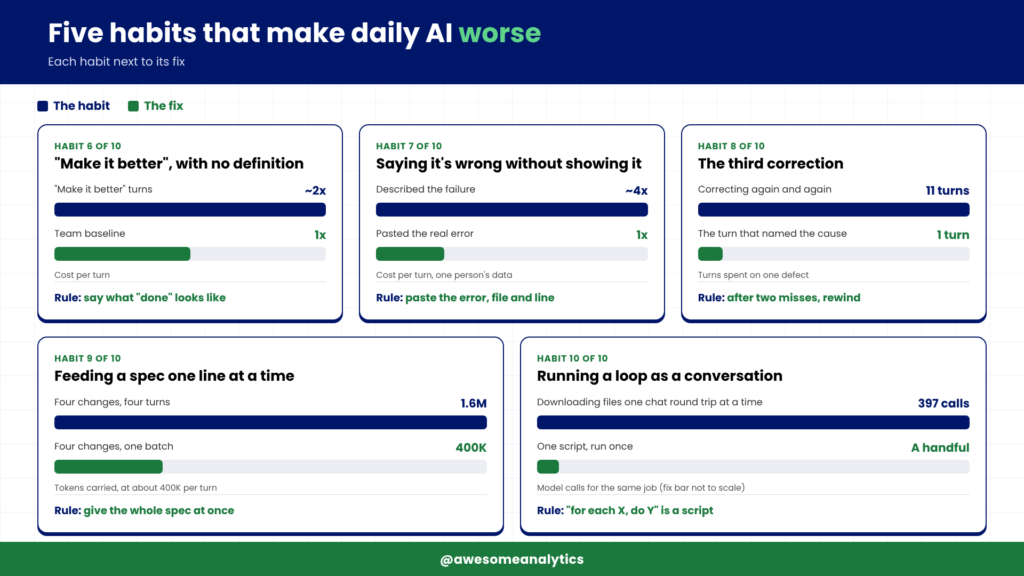
Habit 6. "Make it better", with no definition of better
Across the team, one phrasing appeared more than any other. "Check it properly." "Make it look better." "This is ok, can we improve it." One person typed a version of this 46 times in a month.
These turns cost roughly double the baseline, consistently, and for two reasons. First, an undefined quality bar means the agent has no way to stop. It cannot tell whether it is finished, so it keeps going. One of these produced two hundred calls over thirty-seven minutes.
Second, the judgment lives in your head and not in the prompt, so each round is a guess, and roughly one guess in three gets rejected.
Habit 7. Telling it that it is wrong without showing it what wrong looks like
Here, two behaviours that look almost identical turn out to cost wildly different amounts.
Describing a failure: "that didn't work", "still not right", "same error", plus a screenshot.
Handing over the failure: the actual error text, the file, the line.
Habit 8. The third correction
Habit 9. Feeding a spec one line at a time
Habit 10. Running a loop as a conversation
A note if you are not a developer
These habits are not limited to coding. If you use AI for reports, analysis, emails or presentations, the same five apply:
• Define "better". Instead of "make it better", say what better means: "shorter, more formal, under 150 words".
• Show the actual problem. Paste the real error message or the numbers that are wrong, not "it's still not right".
• Stop after two failed corrections. Start a fresh chat and explain what you have learned so far.
• Give the whole brief at once. Share all your requirements in the first message instead of adding them one by one.
• Use the right tool for repetitive jobs. If the task is "for each row, do this", it belongs in Excel, Power Query, or a script, not a chat.
The machinery nobody was using
Here is the part that made me wince. These tools ship with a lot of built-in machinery that exists precisely to keep conversations small and rework low: reusable commands, saved workflows, planning modes, delegation to subagents.
And when I measured how people were actually writing:

One thing worth checking today
While sweeping the prompt text, I ran a pattern check for credentials. At least four people had pasted secrets directly into a prompt: passwords, a database connection string, a handful of API-key-shaped strings.
Those prompts are now sitting in telemetry storage and in transcript files on the machines that typed them.
If your team uses these tools daily, go and look. It takes ten minutes, and it is the highest-value thing in this article that has nothing to do with cost. If you find any, treat them as exposed: change the password or rotate the key straight away. Deleting the prompt does not make the secret safe again.
And one thing about measuring any of this
I will end with the part I am least proud of. We built a set of measurements to score how people were prompting. When the analysis came back, five of our eight prompt-quality measures turned out to be wrong. One was matching a word that appeared in a filename. One was measuring two opposite behaviours at once and reporting them as the same thing. One was so strict it scored a real, genuine error paste as zero.
Every single defect was found the same way: by someone reading the actual prompts and noticing that the number disagreed with what was in front of them.
So if you go and do this exercise on your own team, and I think you should, one rule matters more than the rest. Read the raw material before you write a single conclusion, and when your reading disagrees with your dashboard, trust your reading.
The measurement was the easy part. Looking was the part that worked.
I am Mehul Thakkar, founder of Awesome Analytics. This is where I share what we learn from that work, including the parts that did not go to plan.
Subscribe to Awesome Analytics for more practical lessons on using AI at work, straight to your email inbox.
